Hello Community
To rebuild our Production environment on azure, I set up 4 ScaleOut State Servers with Geo-replication (two servers each in two different Azure-VLANs 10.2.x.x and 10.3.x.x).
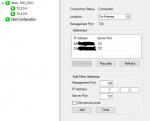
Now I connect from my desktop-pc (where the client is installed too) to the public IPs of these servers in azure cloud and everything seems to work fine. But when I try to open the Object browser on my local computer I get either the error "An unexpected internal error has ocurred" or "A connection to the ScaleOut StateServer service could not be opened...". I'm a bit confused, since the client seems to work fine but the object browser can't connect. Are there other ports than 720-722 which have to be opened? Both IPs are configured in the Client Configuration Tab (I'll attach a screenshot).
I know that there is a specific configuration for azure-cloud but since we have our production evnironment on-premise, it's important, that the testing-environment in the azure cloud is an exact replica.
Is the use of public IPs the problem I'm facing?
Thanks in advance!
Robin